

A new installer of the speaker is likely to enhance clarity and volume. Where distortion is used, it may be annoying. The silver lining is that a product with distorted sound, once it has been installed, is normally in line with the establishment or compatibility of the new speaker, not a defective product. Knowing the source of the distortion will help it be fixed faster and avoid permanent harm to your sound system. This manual describes the most frequent causes of the distortion of a speaker and the manner in which they are fixed.
What Causes Distorted Sound After Speaker Installation
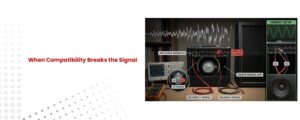
Distorted sound after installing a new speaker is usually caused by setup or compatibility issues rather than a defective unit. A common cause is impedance mismatch, where the speaker’s ohm rating does not align with the amplifier’s output, forcing the amp to work beyond its limits. Incorrect wiring, loose terminals, or reversed polarity can further disrupt the signal path. Another frequent issue is amplifier clipping, which occurs when an underpowered amp is driven too hard, producing harsh distortion. As explained in Wikipedia’s overview of audio clipping, this distortion is a result of signal overload, not speaker failure.
Check Speaker Wiring and Connections
Wiring problems are the most frequent cause of distortion.
Loose or Incorrect Wiring
Loose terminals interrupt the signal flow and introduce noise. Make sure all speaker wires are firmly connected and that positive and negative terminals are correctly matched. Reversed polarity can cause phase issues, reducing clarity and creating hollow or distorted sound.
Damaged or Pinched Speaker Wires
Inspect the entire wire length. Frayed insulation, crushed cables, or exposed copper can short the signal and cause distortion. Replace damaged wires immediately.
Verify Speaker Impedance Compatibility
Impedance mismatch is a critical but often overlooked issue.
Speaker and Amplifier Impedance Mismatch
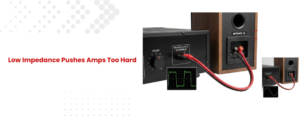
If the new speaker’s impedance is lower than what the amplifier supports, the amp may overwork and clip the signal. This clipping produces harsh distortion, especially at higher volumes. Always confirm that the speaker impedance matches the amplifier’s rated output.
This issue is common when upgrading or replacing factory speakers.
Adjust Amplifier Gain and EQ Settings
Distortion often comes from incorrect amplifier settings rather than the speaker itself.
Gain Set Too High
Gain controls signal input level, not volume. If the gain is too high, the amplifier sends a clipped signal even at moderate listening levels. Lower the gain and increase volume gradually.
Excessive Bass or Treble Boost
Aggressive EQ settings push speakers beyond their mechanical limits. Reduce bass boost and extreme treble to see if distortion disappears. Balanced EQ improves clarity and protects the speaker.
Allow Time to Break In New Speakers
New speakers need a short break-in period.
Why Break-In Matters
Fresh speaker cones and surrounds are stiff. Playing at high volume immediately can cause distortion. Play music at moderate levels for several hours to allow the components to loosen naturally. Sound quality typically improves after this period.
Inspect Physical Installation and Mounting
Mechanical issues can sound like electrical distortion.
Loose Mounting or Vibrations
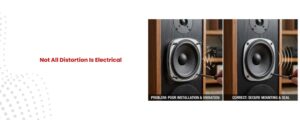
Ensure the speaker is mounted evenly and securely. Loose screws, uneven surfaces, or thin mounting panels can vibrate and create rattling noises. Tighten all hardware and check surrounding panels or grills.
Match Speaker Power Handling
Power mismatch affects sound quality and safety.
Underpowered or Overpowered Systems
An underpowered amplifier may clip when pushed, while overpowering a speaker can cause mechanical distortion. Check RMS power ratings on both the speaker and amplifier to ensure they are compatible.
Test with Another Audio Source
Eliminate external signal problems.
Faulty Source or Cable
Distortion may come from a damaged cable, poor audio file, or malfunctioning source unit. Test with a different source or cable to isolate the issue quickly.
When to Suspect a Defective Speaker
Speaker defects are rare but possible.
Signs of Speaker Damage
If distortion persists after checking wiring, impedance, settings, and mounting, test the speaker in another system. Consistent distortion across systems may indicate a defective unit that needs replacement.
Conclusion
Distorted sound after installing a new speaker is usually caused by wiring errors, impedance mismatch, incorrect gain settings, or installation issues—not the speaker itself. By methodically checking each part of the setup, you can restore clean, balanced sound and protect your audio system from damage.
Proper setup ensures your new speaker delivers the performance you expected.